Is WordPress.com Safe, Legit & Good for Business in 2026? (Honest Review)
When building a website, the first question is rarely about design or features—it is about trust. In 2026, with cyber threats evolving and the digital landscape more competitive than ever, the question “Is WordPress.com safe?” dominates the search results. For small business owners, bloggers, and enterprise managers, the stakes are high. A compromised site means lost revenue, damaged reputation, and potentially a ruined business.
To answer whether WordPress.com is safe, legit, and reliable, we must look beyond marketing claims and evaluate the platform’s actual architecture, ownership, and performance data. This article provides a radical, honest evaluation of WordPress.com’s security posture, its legitimacy as a corporate entity, its SEO limitations, and its ultimate suitability for business websites in 2026. We will separate the hype from the reality, providing clear verdicts so you can make an informed decision.
WordPress.com Trust & Decision Dashboard
An honest, data-backed evaluation of safety, reliability, and business suitability for 2026.
Safety
Excellent
Enterprise WAF & daily malware scans.
Legitimacy
Verified
Owned by $7.5B Automattic.
Reliability
99.99% Uptime
Elite 357ms server response.
SEO Tools
Business+
Advanced SEO unlocks at $25/mo.
For Business?
Yes, if Managed
Choose Business plan or higher.
✓ You’re a perfect fit if…
- You want a business site that stays secure without hiring an IT team.
- You value 99.99% uptime and elite 357ms server speed out of the box.
- You’d rather pay a fixed monthly fee than manage a server yourself.
- You can invest in the Business plan for full SEO and plugin power.
✗ Skip it if…
- You need advanced SEO tools but your budget caps at under $25/month.
- You’re a developer who wants full server and custom-code access.
- You want the lowest possible recurring cost for a hobby site.
💡 Our verdict for 2026
For a serious business site, the Business plan ($25/month) is where WordPress.com becomes unbeatable: custom domains, no branding, advanced SEO plugins, and full server access — all protected by enterprise-grade security. It removes every technical headache so you can focus on growing your business.
No risk: 30-day money-back guarantee · cancel anytime · free migration help included
Who Owns WordPress.com? The Corporate Reality
Before assessing the safety of the platform, it is crucial to understand who is behind it. When people ask, “Who owns WordPress.com?” they are often confusing the hosted service (WordPress.com) with the open-source software (WordPress.org). Understanding this distinction is the first step in evaluating the platform’s legitimacy.
WordPress.com is owned and operated by Automattic, a global, fully remote company founded in 2005. Automattic is not a fleeting startup; it is a massive technology conglomerate valued at over $7.5 billion. The company manages a portfolio of powerhouse brands, including Jetpack, WooCommerce, Tumblr, Akismet, and Gravatar.
Because Automattic employs over 1,400 people and generates an estimated $710 million in annual recurring revenue, the platform has immense resources dedicated to maintaining its infrastructure 2. This corporate backing is the primary reason WordPress.com is considered highly legitimate. You are not relying on a solo developer; you are utilizing an enterprise-grade hosting environment backed by one of the largest web infrastructure companies in the world. This level of corporate stability provides a baseline of trust that cheaper, lesser-known hosts cannot match.
The Security Architecture: Is WordPress.com Actually Safe?
The short answer to “Is WordPress.com safe?” is an emphatic YES.
However, to understand why, we must separate the managed hosting environment from the self-hosted WordPress software. The security posture of the two is fundamentally different. Many security breaches on self-hosted sites occur because site owners fail to update their themes or plugins, leaving known vulnerabilities exposed. WordPress.com handles this entirely for you, ensuring that the core software is always patched against the latest threats.
Self-hosted WordPress (WordPress.org) is frequently targeted by hackers, primarily because users run outdated plugins, use weak passwords, or utilize cheap, unsecured hosting. The responsibility for security falls entirely on the site owner. WordPress.com eliminates these vulnerabilities by design. It is a fully managed platform where Automattic handles all the underlying infrastructure, creating a much safer environment for users who do not want to manage their own security.
Enterprise-Grade Protections
As of 2026, WordPress.com’s security architecture includes several layers of protection that are often locked behind expensive paywalls on other hosting providers. These built-in features are what make the platform genuinely safe for businesses.
- Web Application Firewall (WAF): WordPress.com employs a custom WAF that examines all incoming traffic. It automatically blocks malicious bots, suspicious IP addresses, and distributed denial-of-service (DDoS) attacks before they ever reach your site. This proactive defense is critical for preventing downtime and data breaches.
- Daily Malware Scans: Through the integration of Jetpack Scan, the platform checks every WordPress.com site daily for malware, vulnerable plugins, and dangerous themes. If a threat is detected, the dedicated Automattic security team intervenes to resolve the issue.
- Mandatory SSL Encryption: There is no option to disable HTTPS on WordPress.com. Every site, including free ones, is forced into secure SSL encryption with automatic 301 redirects from HTTP to HTTPS. This ensures that all data transmitted to and from the site is encrypted.
- Automated Core Updates: The underlying WordPress software is kept meticulously up-to-date. Users cannot accidentally neglect a critical security patch, which is a common point of failure on self-hosted sites.
The Bug Bounty Commitment
Automattic’s commitment to security is further evidenced by its HackerOne bug bounty program. They actively invite ethical hackers to test their systems and reward them for finding vulnerabilities. This proactive approach to security testing is a hallmark of a legitimate, trustworthy technology provider. It demonstrates that Automattic is confident in their defenses and is willing to pay for independent verification.
Reliability and Uptime: The 2026 Data
A platform can be secure but unreliable if the servers constantly go down. For a business, downtime equals lost sales and frustrated customers. Is WordPress.com reliable in 2026?
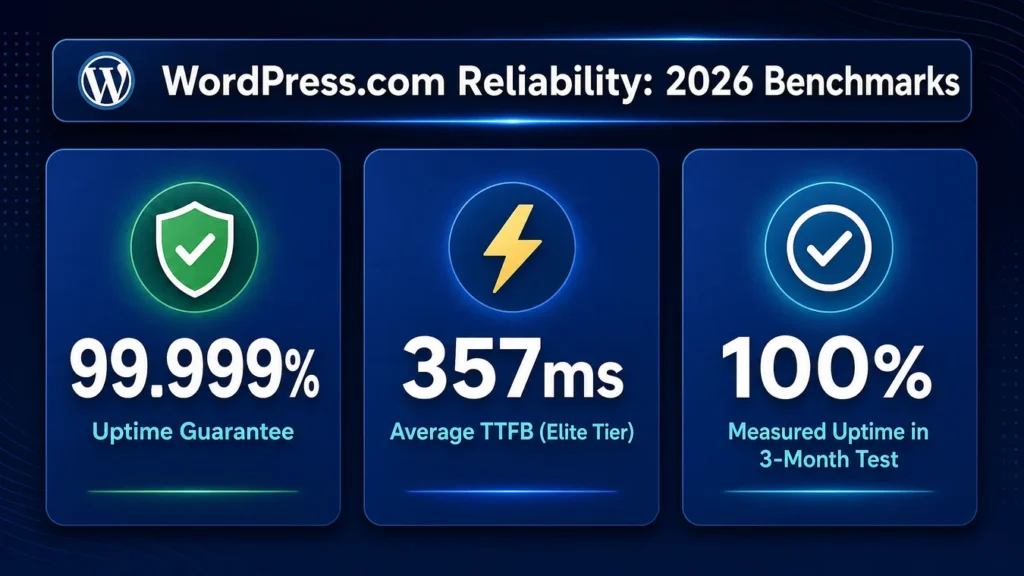
Independent hosting benchmarks provide the most objective answer. According to 24/7 monitoring data from late 2025 into 2026, WordPress.com has established itself as a top-tier performer for speed and reliability.
In Q4 2025 benchmarks testing Time to First Byte (TTFB)—a critical metric for server response time—WordPress.com recorded an elite 357ms average TTFB. This places it firmly in the top tier of managed WordPress hosts, outperforming many legacy shared hosting providers. Fast server response times are essential for both user experience and search engine rankings.
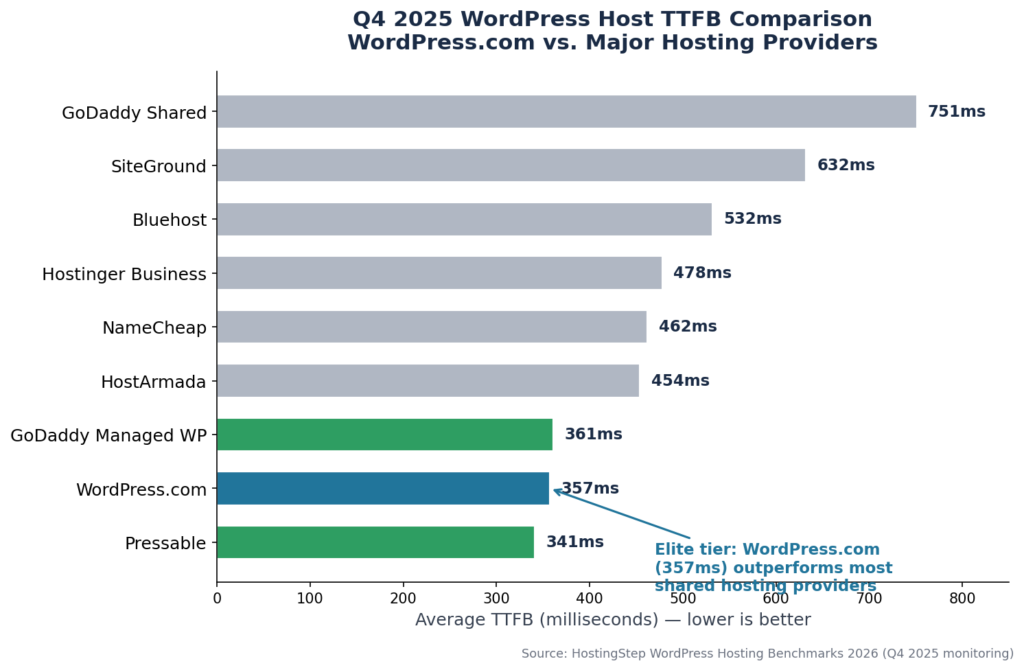
Furthermore, independent tests by major WordPress review outlets in May 2026 confirmed that WordPress.com delivered 100% uptime over continuous multi-month testing periods. The platform boasts a 99.999% uptime guarantee, supported by a global Content Delivery Network (CDN) and automated datacenter failover. This level of redundancy means that if one data center experiences an issue, traffic is immediately rerouted to another, ensuring your site remains online. For business owners concerned about reliability, WordPress.com is statistically one of the most dependable platforms available. You can trust that your site will remain accessible to your customers, even during periods of high traffic.
The SEO Reality: Is WordPress.com Good for SEO?
While the platform excels in security and uptime, the question “Is WordPress.com good for SEO?” requires a more nuanced answer. SEO is a critical component of business success, and the platform’s approach to it has significant limitations.
WordPress.com provides excellent foundational technical SEO on all plans. Every site automatically benefits from clean HTML structure, mobile-responsive design, canonical URL handling, and automatic XML sitemap generation 7. The elite server speeds (357ms TTFB) also contribute positively to Google’s Core Web Vitals metrics 5. These foundational elements are crucial for any site hoping to rank in search results.
However, advanced SEO capabilities are strictly gated behind the platform’s pricing tiers. This is a major point of frustration for many users.
The SEO Limitations of Lower Plans
On the Free, Personal, and Premium plans, users have almost no control over on-page SEO. You cannot write custom meta descriptions, you cannot customize SEO titles, and you cannot install third-party SEO plugins like Rank Math or Yoast SEO 7.
If you are trying to rank for competitive keywords, the Free and Personal plans are severely limiting. You are relying entirely on Google to interpret your content without providing it the structured data or custom metadata it prefers. This lack of control can severely hinder a business’s ability to attract organic traffic.
Unlocking SEO on the Business Plan
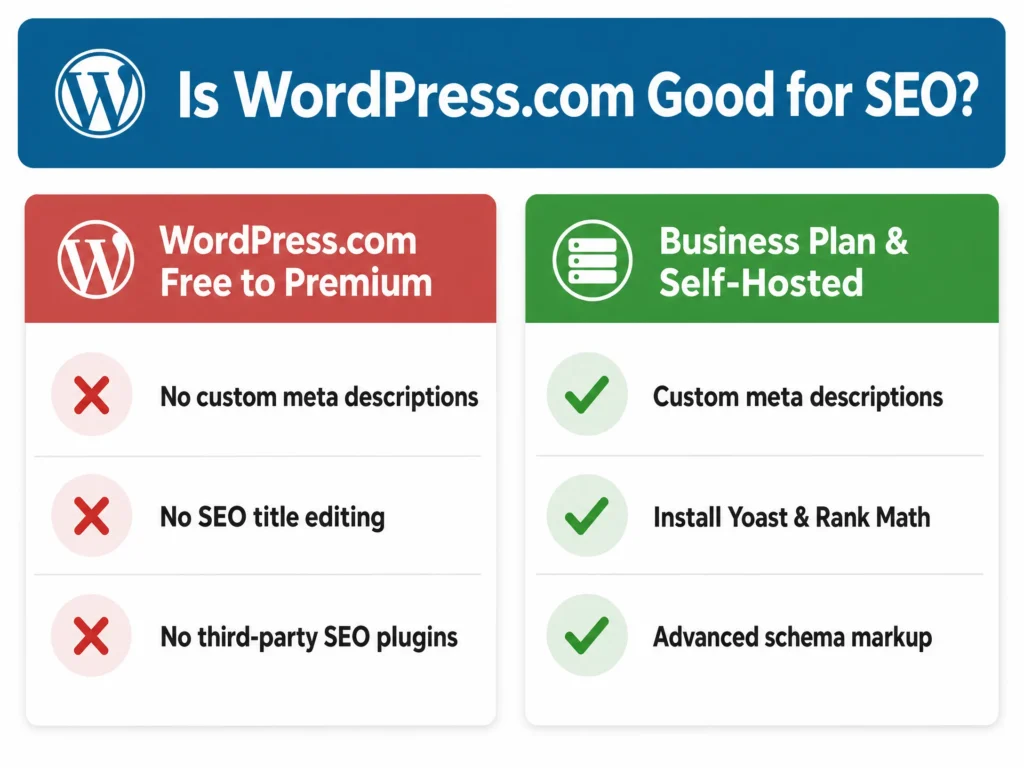
To access meaningful SEO tools, you must upgrade to the Business plan (currently $25/month or $300/year) 7. This tier unlocks Jetpack SEO tools, allowing you to customize page titles, write custom meta descriptions, and preview social media shares 7. Crucially, the Business plan also allows the installation of third-party plugins, meaning you can finally add advanced schema markup, internal linking tools, and comprehensive SEO audit checklists 7.
The Verdict on SEO: WordPress.com is technically excellent for SEO speed and infrastructure, but it is only practically “good for SEO” if you can afford the Business plan to unlock plugin installation. If your budget is tight, you will find the platform’s SEO limitations frustrating.
Business Suitability: Pros, Cons, and the Data Ownership Question
Is WordPress.com a good choice for a business website? The answer depends heavily on your budget and your need for customization. For some businesses, it is the perfect solution; for others, it is a poor fit.
The Pros for Business
For small to medium businesses that lack dedicated IT teams, WordPress.com offers unparalleled convenience. You do not need to worry about server maintenance, software updates, or malware removal. The platform provides enterprise-grade security out of the box, ensuring your business site remains online and secure 3. The interface is unified, removing the dual learning curve of managing separate hosting and site-building tools. This allows business owners to focus on their core operations rather than technical maintenance.
The Cons for Business
The primary drawback for businesses is cost. To get the features necessary for a professional online presence—custom domains, removal of WordPress.com branding, and advanced SEO plugins—you must spend at least $25 to $45 per month 8. This recurring expense can add up over time, especially for businesses operating on tight margins. Furthermore, the interface, while powerful, can feel complicated for users accustomed to simpler drag-and-drop builders like Wix or Squarespace 9. The learning curve can be steep for those who are not already familiar with the WordPress ecosystem. While the unified dashboard is a plus, users often find themselves navigating multiple menus to accomplish simple tasks, which can slow down content creation and site management. This complexity can be a significant barrier to entry for non-technical business owners who expect a more intuitive, modern design experience.
The Data Ownership Concern
A common concern among business owners is data ownership. When using a hosted platform, users often worry about being locked in. This concern is valid, as hosting your site on a third-party platform means you do not have direct access to the underlying server files.
On WordPress.com, you own your content. However, the platform retains a high degree of control over the infrastructure. If WordPress.com changes its policies, prices, or even decides to deprecate certain features, you are at their mercy. While they do offer export tools to move your content to a self-hosted WordPress.org site, migrating a fully functional business website from a managed platform to self-hosted hosting requires significant technical effort and resources 10. This potential for vendor lock-in is a risk that business owners must weigh carefully. You must consider whether the convenience of a managed platform outweighs the flexibility of owning your own server infrastructure.
Common Myths vs. Reality
Because WordPress is so popular, it is surrounded by misconceptions that often bleed over into the WordPress.com ecosystem. Addressing these myths is crucial for understanding the platform’s true capabilities.
Myth 1: WordPress is easily hacked.
Reality: Self-hosted WordPress sites are frequently hacked because users neglect updates or install malicious plugins. WordPress.com, however, is heavily secured by a WAF, daily scans, and forced SSL. It is vastly safer than a poorly maintained self-hosted site. The security of the managed platform is a major advantage.
Myth 2: WordPress.com is the same as WordPress.org.
Reality: WordPress.org is free software that you install on your own server; WordPress.com is a commercial hosting product run by Automattic. The security and management responsibilities are completely different. Confusing the two leads to misplaced expectations about the platform’s capabilities and costs.
Myth 3: You can install any plugin on WordPress.com
Reality: Plugin installation is strictly locked behind the Business plan. Users on lower tiers are limited to the built-in features provided by Automattic. This is a significant limitation for those who rely on specific plugins for their business operations.
Clear Verdicts: Who Should Use It and Who Should Avoid It
After evaluating the security, reliability, SEO, and business suitability, we can provide clear guidance. The decision to use WordPress.com should be based on a clear understanding of your business’s needs and budget.
Who Should Use WordPress.com
WordPress.com is an excellent choice for small businesses, agencies, and creators who prioritize security, uptime, and a managed environment over absolute control. If you have the budget for the Business or Commerce plans, you will receive a highly reliable, fast, and secure infrastructure that frees you from technical maintenance. It is particularly suited for teams that want the power of WordPress without the burden of DevOps. The platform allows you to focus on your content and your customers, rather than on server configurations. For e-commerce businesses, the Commerce plan offers specialized features like automated tax calculations and advanced inventory management, making it a robust solution for online stores.
Who Should Avoid WordPress.com
WordPress.com is not for everyone. You should avoid it if you are on a strict budget and need advanced SEO capabilities, as those tools are locked behind the $25/month paywall. You should also avoid it if you are a developer who requires full server access, custom PHP modifications, or the ability to install any third-party software. Finally, if you want the ultimate ownership and control of your digital asset with minimal recurring monthly fees, self-hosted WordPress (WordPress.org) paired with a managed host is a better fit. The limitations of the lower-tier plans make them unsuitable for serious business endeavors. If you are building a highly customized web application rather than a standard business site, the platform’s restrictions will likely hinder your development process.
Conclusion
Is WordPress.com safe, legit, and good for business in 2026? The data confirms that it is exceptionally safe, backed by a multi-billion dollar corporation, and highly reliable. It offers enterprise-grade security and speed that rivals the best hosting providers on the market. The platform provides a solid foundation for any business looking to establish an online presence.
However, its suitability for business is strictly tied to your budget. It is a premium, managed service. If you are willing to pay for the Business plan, WordPress.com provides a secure, powerful foundation for your online presence. If you are looking for a cheap, highly customizable environment, you will likely find its paywalls frustrating. Trust the platform for your security, but evaluate your budget carefully before committing. By understanding the platform’s strengths and limitations, you can make a decision that best serves your business goals.