WordPress.com Pricing & Plans 2026: Free to Commerce Explained and Compared
Most people open the WordPress.com pricing page and stop at the $4 number. That number is real, but it’s the annual rate. Pay month to month and the same plan is $9. The free domain lasts one year. And the big 2026 change almost nobody mentions up front: you can install plugins on every paid plan, starting with Personal. Similarly there are many crucial points, that we shall discuss here, in order to help you pich the best fit plan for your site.
Each plan bundles hosting, security, and support into one subscription, but the value differs wildly between tiers. Below, we rank all five tiers against each other based on storage limits, customization freedom, monetization tools, and business features.
You do not need the Business plan just to add a contact form or SEO plugin anymore.
This page shows the five plans, what each one actually unlocks, and the billing traps that turn a $4 site into a $9 habit. Prices below are the US rates listed on wordpress.com/pricing as of October 2026. Confirm at checkout before you buy.
Verified October 2026 · Official pricing
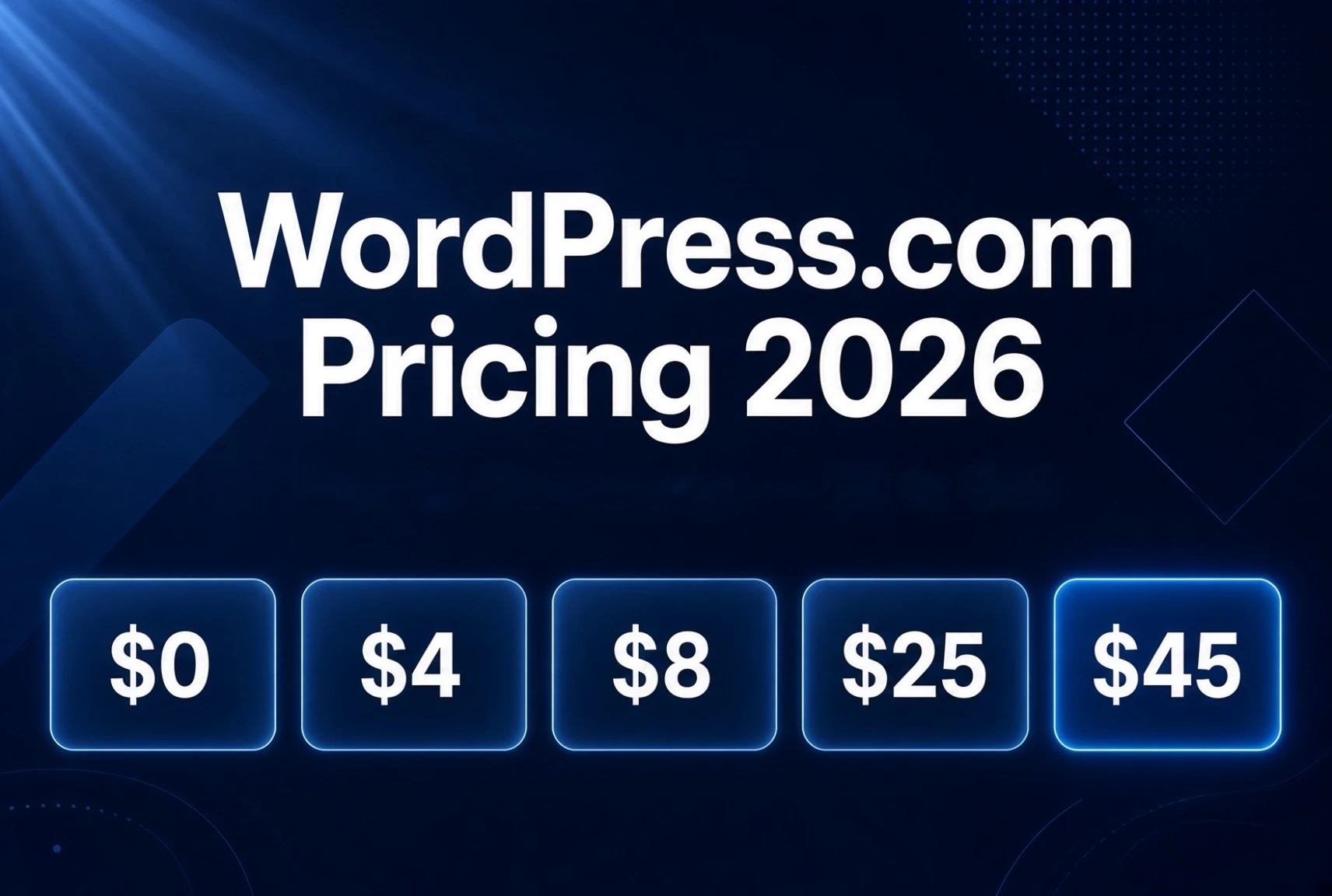
WordPress.com Pricing 2026
Free → Commerce, explained
Five plans. One job: match the plan to what the site has to do. Plugin access is on every paid plan. The real differences are backups, developer tools, priority support, and how you sell.
Free
$0
forever
Personal
$4
/mo annual
Premium
$8
/mo annual
Business
$25
/mo annual
Commerce
$45
/mo annual
Free
Sandbox only. Learn the editor. Not a real public site.
- ✓ 1 GB · subdomain
- ✓ Block editor
- ✗ No custom domain
- ✗ Ads on your site
- ✗ No plugins
Personal
Your domain, no ads, plugins. The real starting line for most people.
- ✓ Free domain year 1 (annual)
- ✓ 6 GB · ad-free
- ✓ Plugins + custom CSS
- ✓ Email / chat support
- ✗ No backups or SFTP
Premium
Monetize: video, payments, all themes. Still no developer tools.
- ✓ All premium themes
- ✓ 13 GB · video hosting
- ✓ Payment buttons · WordAds
- ✓ Premium stats
- ✗ No backups or staging
Business
Backups, SFTP, staging, priority support. The professional step up.
- ✓ 50 GB · real-time backups
- ✓ SFTP/SSH · staging · GitHub
- ✓ VideoPress 250 GB · MailPoet
- ✓ $200 Blaze credits · email year 1
- ✓ 24/7 priority Happiness Engineers
Commerce
WooCommerce ready. Unlimited products. Store tools already on.
- ✓ Unlimited products & orders
- ✓ WooPayments · 0% platform fee
- ✓ Abandoned carts · shipping & tax
- ✓ Gift cards · bundles
- ✓ Everything in Business
30-second decision
The five plans in one sentence each
WordPress.com sells five plans. Hosting is included on all of them. You never buy a separate server.
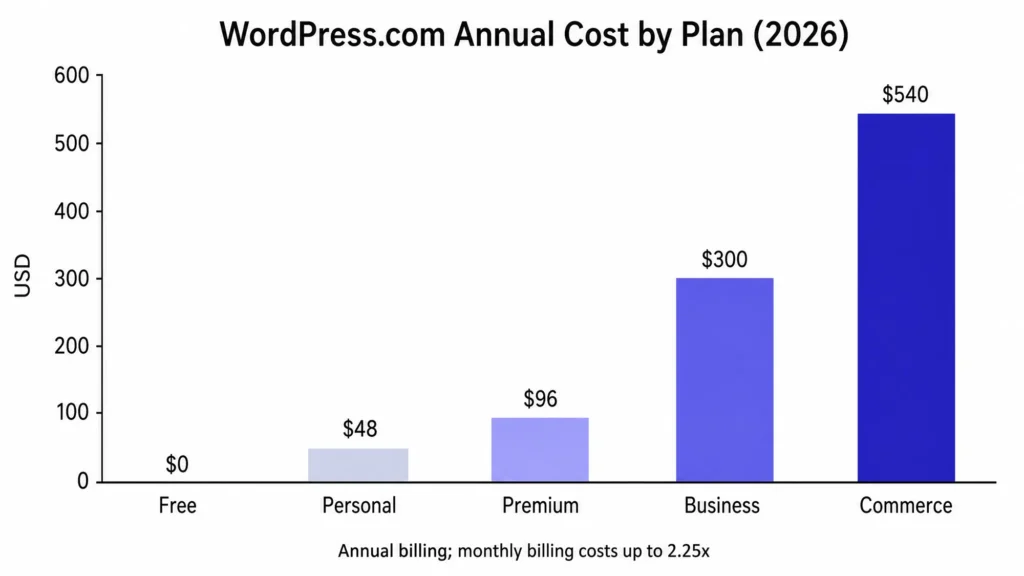
| Plan | Annual (first year) | Monthly | Best for |
|---|---|---|---|
| Free | $0 | $0 | Testing the editor |
| Personal | $4/mo ($48/yr) | $9/mo | Blog or portfolio that needs its own domain |
| Premium | $8/mo ($96/yr) | $18/mo | Monetize, video, or better stats |
| Business | $25/mo ($300/yr) | $40/mo | Real site that needs backups, SFTP, or staging |
| Commerce | $45/mo ($540/yr) | $70/mo | Store with WooCommerce already set up |
Annual plans include a free custom domain for the first year. Monthly plans do not. Plugins work on every paid plan. Developer tools (SFTP, SSH, staging, real-time backups) start at Business.
What changed in 2026 (and why it matters)
The pricing page looks familiar, but two things shifted enough to change which plan most people should buy.
First, plugins. Until April 2026, installing third-party plugins was locked behind Business. That forced a big jump for anyone who just wanted Rank Math, a better form, or a membership plugin. Official WordPress.com docs and the 2 April 2026 announcement now say plugins work on every paid plan, starting with Personal. You can search the WordPress.org directory or upload a .zip. Free still cannot.
Second, bundling. Business now includes MailPoet (500 subscribers), VideoPress with 250 GB, and $200 in Blaze credits. Commerce folds in WooCommerce premium extensions that used to cost extra on a self-hosted store. The old “Entrepreneur” plan name is gone; it is now Commerce. If an older review still says Entrepreneur, treat it as Commerce and re-check the current price.
These changes make the lower tiers stronger. The gap between a $4 Personal site and a $45 Commerce store is still wide, but the middle got more useful instead of staying limited.
Support that actually covers beginners
This is the part most pricing tables skip. WordPress.com support is run by Happiness Engineers. They are not generic hosting agents. They know the WordPress editor, themes, plugins sold through the platform, domains, and common setup problems.
On paid plans you can reach them through the Help Center in your dashboard (question mark icon). Free users get community forums. Personal and Premium get email and chat. Business and Commerce get 24/7 priority support with faster response.
For a beginner, this matters. Many technical issues that would stall a self-hosted site (plugin conflicts, domain connection, basic styling, billing) get solved by the team without you hiring a developer. That keeps your focus on the actual business instead of server work.
It is not unlimited. Custom code, complex third-party plugins not sold by WordPress.com, or deep design work can still need an outside developer. Support quality is generally strong on the issues they cover (Trustpilot sits around 3.8/5 overall; G2 higher). Response speed and depth improve on Business and above.
If the site is how you make money, the priority support on Business is one of the clearer reasons to step up from Personal or Premium.
WordPress.com Pricing Plans Explained
WordPress.com offers five plans. Hosting is included on every one of them, so you never buy a separate server. The free plan is only for testing. Every paid plan now lets you install plugins (a change that arrived in April 2026). The real differences sit higher up: storage, video and payments, real-time backups, developer tools (SFTP, staging), priority support, and whether the store tools are already turned on.
The prices below are the US annual rates listed on the official pricing page as of October 2026. Monthly billing costs more and does not include the free domain for the first year. Confirm the rate at checkout before you buy.

Free — $0
You get a yoursite.wordpress.com address, 1 GB storage, basic stats for the last seven days, and WordPress.com ads shown to visitors. No custom domain, no plugins, no premium themes.
It is useful for testing the editor or drafting. It is not useful as a public site you care about. The moment you want your own domain or a contact form, you upgrade.
Personal — $4 a month (annual) or $9 monthly
This is the plan most people should start on if they need a real site.
You get 6 GB storage, your own domain (free the first year on annual billing), an ad-free experience for visitors, all premium themes, and the ability to install plugins. Support is available. You do not get VideoPress uploads, payment buttons, premium analytics, or real-time backups.
Skip it if you plan to sell products, need video hosting, or already know you will want staging and SFTP. Those live on higher plans.
Choose it if you run a blog, a simple portfolio, or a small business site that needs a contact form and basic SEO. The plugin change makes this plan far more useful than it was in 2025.
Premium — $8 a month (annual) or $18 monthly
Everything in Personal, plus 13 GB storage, the ability to upload videos, payment buttons (PayPal or Stripe), premium stats, and the option to earn from ads.
It is the step up when you want to monetize or show video without leaving WordPress.com. You still do not get SFTP, staging, or real-time backups. Those remain Business and above.
Choose it if you create content and want to make money from it, or if you need video without a third-party host.
Skip it if you need developer access or automatic backups. Jump to Business.
Business — $25 a month (annual) or $40 monthly
This is where WordPress.com starts to feel like a proper managed host.
You get 50 GB storage (add-ons available), real-time backups with one-click restore, SFTP/SSH, WP-CLI, GitHub deployments, a staging site, 24/7 priority support, VideoPress with 250 GB, free business email for one year, MailPoet for 500 subscribers, and $200 in Blaze ad credits. Plugins and all the lower-plan features are included.
Choose it if the site makes money, you want to test changes before they go live, or you need a human who answers quickly.
Skip it if you only need a blog with a contact form. Personal or Premium will do that for less.
Commerce — $45 a month (annual) or $70 monthly
Business plus a full WooCommerce store setup. Unlimited products, premium store extensions, multi-currency, and 0% transaction fees on WooCommerce payments. Storage and developer tools stay the same as Business.
Choose it if you are building a real store and want the tools turned on from day one.
Skip it if you only need a payment button or a simple product list. Premium or Business plus a free plugin may be enough.
Annual vs monthly: the trap that costs the most
The big numbers on the pricing page are annual rates. Monthly is higher:
- Personal: $4 annual vs $9 monthly
- Premium: $8 vs $18
- Business: $25 vs $40
- Commerce: $45 vs $70
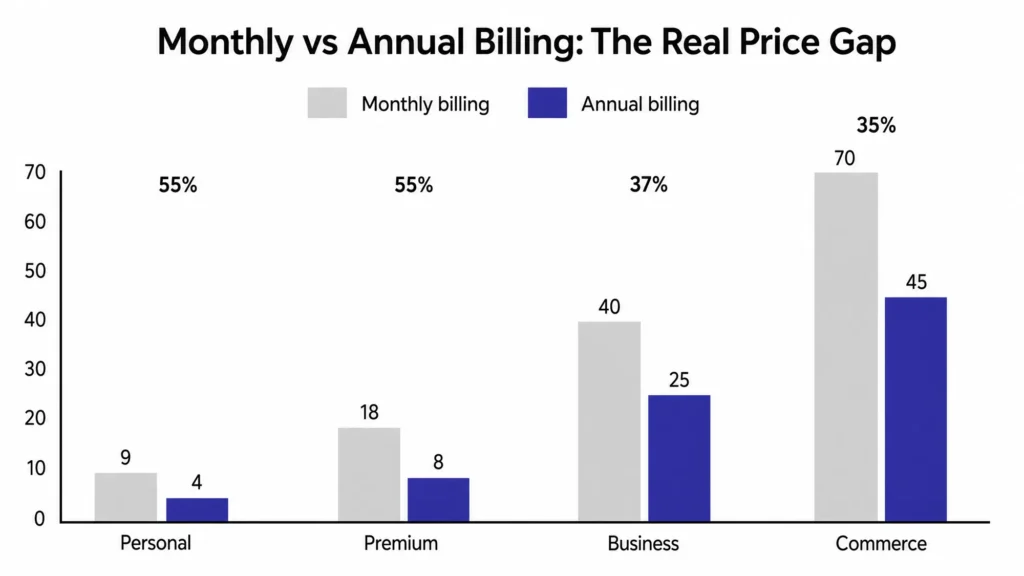
Annual also includes the free domain for year one. Monthly does not. Refund windows are short (roughly 7 days monthly, 14 days annual). Once the term is past, you are on the renewal price.
If you are sure you will keep the site, annual is the cheaper path. If you are testing, monthly is safer, but budget for the higher rate.
Which plan matches which job
- Testing the editor or drafting: Free.
- Blog, portfolio, or simple site that needs its own domain and a few plugins: Personal.
- Content site that wants video, payments, or better stats: Premium.
- Site that earns money, needs backups, staging, or SFTP: Business.
- Online store with WooCommerce already configured: Commerce.
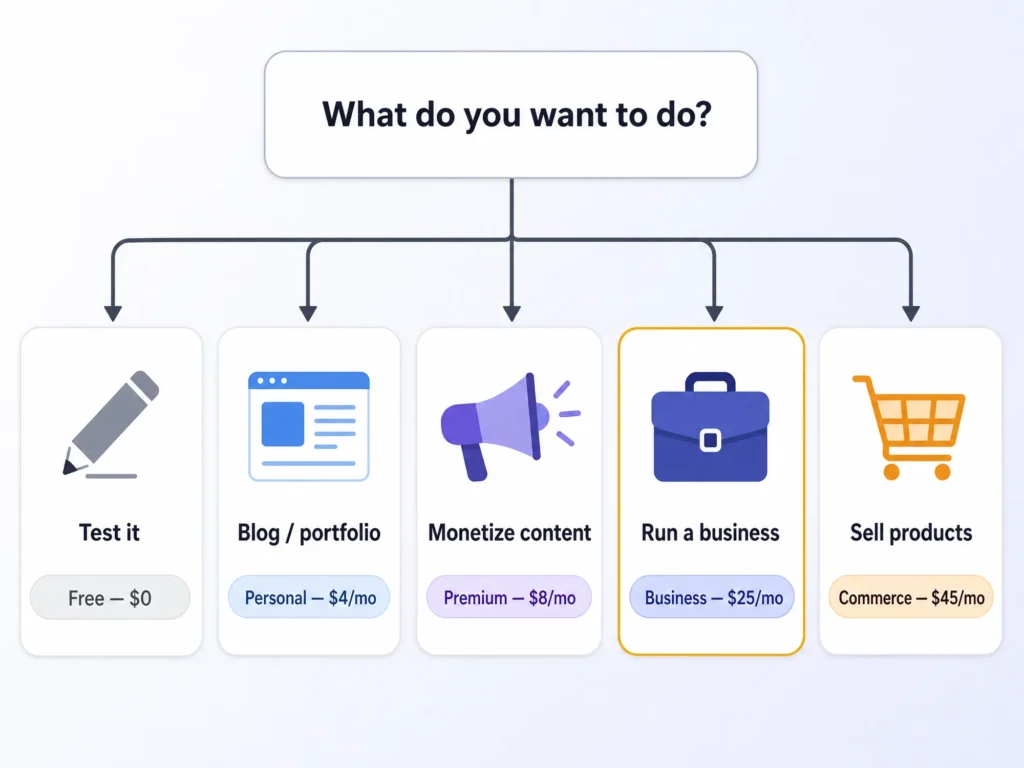
Most people who just want a clean site with plugins land on Personal or Premium. Business is the right jump when the site matters enough that downtime or a broken update would hurt.
Match the plan to what the site needs this month, not next year. You can upgrade later and your content moves with you.
- Blog or portfolio → Personal
- Monetize or better analytics → Premium
- Real business site with backups & staging → Business
- Store → Commerce
Hidden costs that do not appear on the plan card
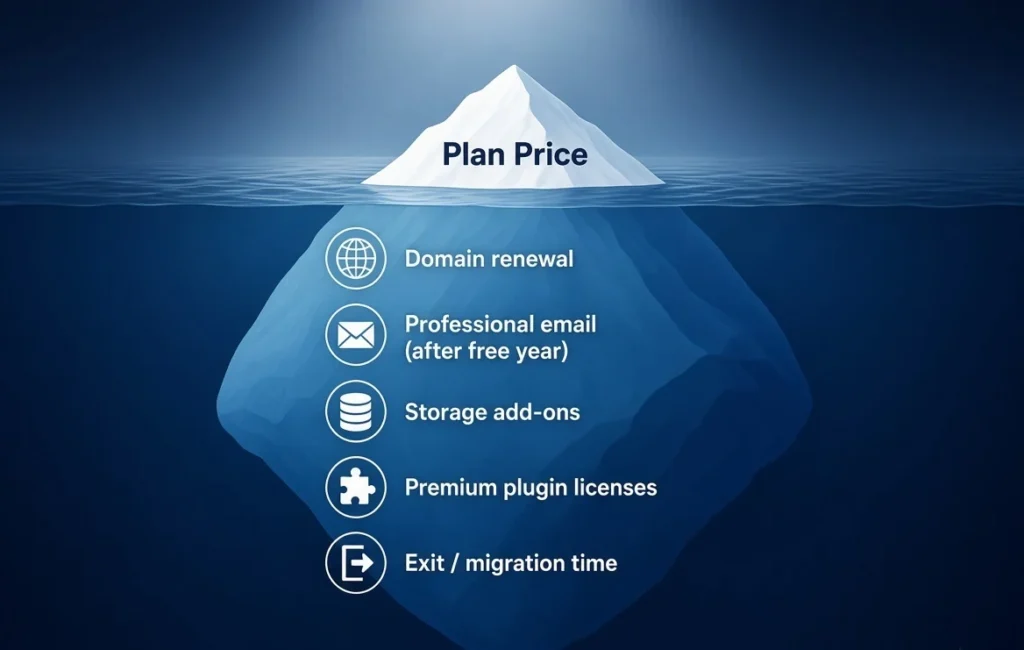
- Domain renewal. The first year is free on annual plans. Year two is the normal registrar price (often $12–15 for a .com). Budget for it.
- Professional email. Business and Commerce plans include one free business email (Titan) for the first year. After that, or on lower plans, Professional Email is a paid add-on (typically starting around $3–4 per mailbox per month after any trial). Confirm the exact offer at checkout.
- Storage add-ons. 50 GB is generous. Extra storage is an add-on if you upload a lot of video or large files.
- Premium plugins. You can install them. Some still charge their own license. WordPress.com does not cover those fees.
- Leaving later. Exporting is possible. Moving a complex Commerce store or a heavily customized theme takes time. Plan the exit before you need it.
When self-hosted WordPress costs less
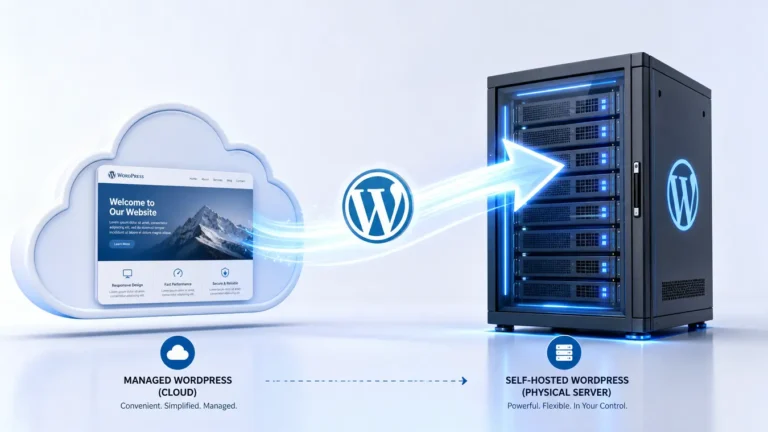
WordPress.com is the managed option. You pay for the platform and they handle updates, security, and hosting. Self-hosting (WordPress.org software on a host you choose) can be cheaper once you need many premium plugins, custom code, or full server control.
The crossover usually appears when:
- You need several paid plugins that WordPress.com does not discount.
- You want full SFTP and database access without the Business plan.
- You are comfortable managing updates and backups yourself.
For most people who just want to publish, the managed path on Personal or Business is still simpler. See our WordPress.com vs WordPress.org guide for the full comparison.
WordPress.com pricing in 2026 is more flexible than it used to be. Plugins work on every paid plan and the lower tiers are stronger.
Confirm the current annual rate and free domain offer at checkout, then pick the plan that matches the job in front of you.
FAQ
Which WordPress.com plan should I start with?
Can I install plugins on the Personal plan?
Is the $4 price real?
Do annual plans include a free domain?
How good is WordPress.com support for beginners?
What is the difference between Business and Commerce?
Can I upgrade later?
Prices and features can change. Check wordpress.com/pricing before you buy.