Cloud Hosting vs VPS Hosting 2026 – Choose the Right One
When you search for “cloud hosting vs VPS,” most articles treat these as two completely separate universes. The truth is messier and far more useful: both cloud hosting and VPS hosting rely on virtualization technology, both can run your website or application reliably, and both have legitimate strengths and weaknesses depending on your specific situation. The meaningful distinction isn’t the label alone—it’s the operational model, billing structure, and how the infrastructure responds to change.
The decision between cloud hosting and VPS hosting has become increasingly nuanced in 2026. Providers blur the lines deliberately, marketing “cloud VPS” solutions that combine elements of both. Meanwhile, traditional VPS providers add cloud-like features, and cloud platforms offer more predictable pricing. This guide cuts through the marketing noise and gives you a practical framework to make a confident decision based on your actual traffic patterns, technical skill, budget constraints, and growth plans.
We’ll compare real 2026 pricing, examine the hidden costs both models hide from you, and show you exactly when cloud hosting vs VPS hosting wins for your specific use case.
2026 matrix · three products, not two logos
A Hetzner or Vultr box is already a cloud VPS. Elastic AWS, Google Cloud, or Azure autoscaling is a different product. A Cloudways plan is a management layer on top of someone else’s VM. Pick the layer you actually need.
A $4 VPS is not “zero noisy neighbor.” Shared vCPU still shares a host. Dedicated vCPU is the isolation upgrade — and it is priced like one.
Elastic cloud · hotel floors
AWS, Google Cloud, and Azure can add machines while traffic is happening. You pay by the hour and for data leaving the building. That flexibility is the product — not the logo on a tiny VM.
- Bill moves with usage and egress
- Extra rooms only help if the app can use them
- Multi-zone failover is an extra design, not a teaser
VPS · one locked apartment
Hetzner, Vultr, Kamatera, DigitalOcean, OVH, and Contabo sell a reserved apartment in a shared building: published RAM, published cores, a number you can budget. If the building has a bad night, you feel it unless you bought a second apartment.
- Monthly or hourly SKU you can forecast
- Root access — you patch, or you pay someone
- Grow by resizing or migrating, not by magic
Buy this when traffic can jump 5–10× and downtime costs more than the invoice. Autoscaling groups, multi-AZ, and object storage are the product. A marketing page that says “unlimited scale” on a $14 VM is not this.
Watch: a t3.micro / e2-micro / B-series box is still a tiny VPS with a cloud logo. Elasticity is a design, not a plan name.
Buy this when traffic is forecastable and you want root without a hyperscaler bill. You still sit on a hypervisor; the difference is a reserved slice and a number you can budget. Hetzner repriced mid-2026 — do not freeze a $4.50 CX card from an old draft.
Watch: “resize” is often a reboot or a migrate. Snapshot first. Shared vCPU is not dedicated.
Buy this when the team will not patch PHP, Nginx, or backups. DigitalOcean 1 GB on Cloudways listed around $11–$14/mo in 2026 depending on the SKU and promo. You are paying for the control plane, not for a different physics of compute.
Watch: email and domains are usually extra. Vertical resize is easier than true multi-region failover.
Disclosure: sponsored links may be affiliate links. Entry prices move by region, promo, and IPv4 add-ons. Confirm the live SKU and the egress line before you treat a teaser as TCO.
How Cloud Hosting Works: Elasticity and Shared Infrastructure
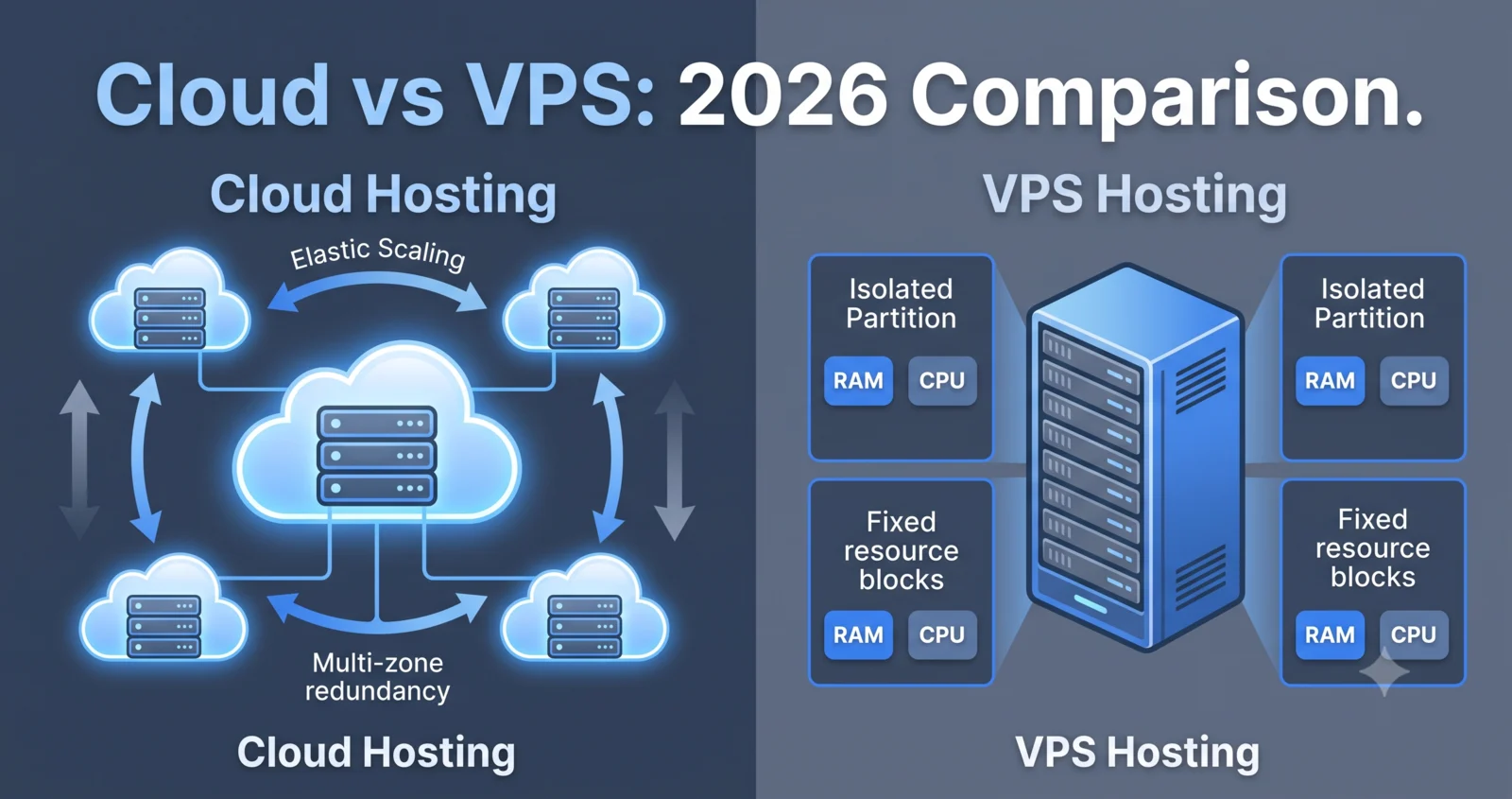
Cloud hosting, in its truest form, distributes your website or application across multiple interconnected servers in a network. When demand spikes, the cloud hosting platform automatically provisions additional resources—more CPU, RAM, or even entire server instances—to handle the load. When demand drops, those resources scale back down, and you pay only for what you used.
This elasticity is powerful. During a traffic spike (a viral social media post, a product launch, Black Friday sales), your site stays fast and responsive without manual intervention. The cloud hosting provider handles the complexity of load balancing, failover, and resource orchestration behind the scenes. You don’t wake up at 3 AM to manually upgrade your server.
However, this flexibility comes with real trade-offs. First, cloud hosting typically costs more per unit of compute than VPS hosting because you’re paying for the convenience of automatic scaling and the provider’s operational overhead. Second, because resources are shared across many customers on the same physical infrastructure, you may experience the “noisy neighbor effect”—a spike in another customer’s traffic can occasionally impact your performance. Third, your monthly bill is unpredictable; it depends on actual usage, and bandwidth overages, data transfer, and backup storage can surprise you at checkout.
Real 2026 Example: Cloudways’ managed cloud platform charges $14/month for 1 GB RAM and 1 vCPU, but adds $0.033/GB/month for offsite backup storage and $0.04/GB for bandwidth beyond the included tier. A SaaS founder running a moderate spike could easily see a $14/month plan balloon to $40–$60 in a single month if traffic surges and bandwidth limits are exceeded. This is the hidden cost of cloud hosting that most comparisons don’t mention.
How VPS Hosting Works: Isolation and Predictable Resources
A Virtual Private Server (VPS) is a virtual machine running on a physical server, isolated from other customers’ VPS instances on the same hardware. You get a guaranteed allocation of CPU cores, RAM, and storage—resources that are reserved for you and cannot be overused by neighbors, even if their sites experience traffic spikes.
This isolation delivers predictable performance. Your site runs at the same speed whether your neighbor’s site is idle or under heavy load. Your monthly bill is fixed; you know exactly what you’ll pay, and there are no surprise bandwidth charges (most VPS plans include generous bandwidth). This predictability is why VPS hosting remains popular for businesses that can forecast their infrastructure needs.
The trade-off is that you’re responsible for managing the server. You have root access, which means you can install any software, configure security, and optimize performance—but you also own the responsibility for patching the OS, monitoring disk space, backing up data, and responding to security threats. If you don’t have the technical expertise or time, you can pay for managed VPS, which adds 50–100% to the base cost but includes provider-managed updates and support.
Real 2026 Example: OVHcloud’s VPS-1 plan costs $4.54/month and includes 2 vCores, 4 GB RAM, 40 GB NVMe SSD, daily backups, and 500 Mbps bandwidth. The price is fixed, and you own the resources. However, if you need to upgrade to 8 GB RAM, you typically must provision a new VPS instance and migrate your data—a manual, time-consuming process. This is where VPS hosting’s weakness appears: scaling up requires effort and downtime.
Side-by-Side Comparison: Architecture, Performance, and Cost
| Dimension | Cloud Hosting | VPS Hosting |
|---|---|---|
| Architecture | Multi-server distributed network; elastic resource pool | Single physical server; isolated VM partitions |
| Scaling | Automatic, real-time; no manual intervention | Manual; requires plan upgrade or new instance |
| Uptime Guarantee | 99.9–99.99% (multi-zone redundancy) | 99.5–99.95% (depends on single node health) |
| Performance Consistency | Variable (shared infrastructure, noisy neighbor risk) | Predictable (dedicated resources, isolated) |
| Billing Model | Pay-as-you-go; usage-based | Fixed monthly; predictable |
| Entry Price | $11–$20/month (managed platforms) | $4–$10/month (unmanaged) |
| Hidden Costs | Bandwidth overages, data transfer, backup storage, auto-scaling premium | Managed services premium, upgrade migration costs |
| Control | Limited (managed platform); API-driven | Full root access; complete customization |
| Management Overhead | Minimal (provider-managed) | Significant (self-managed) or costly (managed VPS) |
| Best For | Unpredictable traffic, rapid growth, minimal ops | Steady traffic, cost predictability, technical users |
This table shows why the choice between cloud hosting and VPS hosting isn’t obvious. Each model excels in different scenarios.
Compare the layer, not the slogan
Cloudways DigitalOcean 1 GB still clusters around $11–$14/mo. Hetzner raised cloud list prices in April and June 2026 — treat any $4.50 CX card as stale until you open the live configurator.
| Provider | Layer | From (indicative) | Root | Scale motion | Best for | Plans |
|---|---|---|---|---|---|---|
| Hetzner Cloud | Cloud VPS | ~$6/mo class after 2026 adjustment | Yes | Resize / new box | EU value, predictable apps | View |
| Vultr | Cloud VPS | ~$6/mo | Yes | Hourly + many metros | Global Linux apps | View |
| Kamatera | Cloud VPS | ~$4/mo Linux | Yes | Custom hourly build | Odd specs, burst tests | View |
| DigitalOcean | Cloud VPS | ~$6/mo droplet | Yes | Resize + apps platform | Dev teams, docs-first | View |
| OVHcloud | Classic / cloud VPS | ~$4–$6/mo VPS-1 class | Yes | Plan change | Fixed bill, EU/NA | View |
| Contabo | Cloud VPS | ~€4–€6/mo class | Yes | Bigger SKU | RAM-per-euro, self-admin | View |
| Cloudways | Managed platform | $11–$14/mo DO 1 GB | Limited | Vertical + staging | WordPress / agency ops | View |
| AWS | Elastic cloud | Usage + egress | If you run EC2 | ASG / multi-AZ | True spike + HA design | View |
| Google Cloud | Elastic cloud | Usage + egress | If you run Compute Engine | MIG / multi-zone | GCP-native stacks, data | View |
| Azure | Elastic cloud | Usage + egress | If you run VMs | VMSS / availability zones | Microsoft estate, hybrid | View |
Indicative Sep 2026 bands, not a live price API. IPv4, backups, Windows, and egress sit on top of every teaser. A Cloudways $11 row is a managed 1 GB VM — not an autoscaling fleet.
Performance Reality in 2026: When Cloud Hosting vs VPS Hosting Wins
Cloud Hosting Wins When:
- Traffic is genuinely unpredictable (e.g., a viral content site, a flash-sale e-commerce platform, or a SaaS product with variable user load).
- You need to handle 10x traffic spikes without manual intervention.
- Your application requires multi-zone or multi-region redundancy for disaster recovery.
- You’re building a product where time-to-market matters more than cost optimization.
- You need global edge delivery to serve users across multiple continents.
VPS Hosting Wins When:
- Traffic is steady and predictable (e.g., a corporate website, a blog with consistent readership, or an internal tool).
- You can accurately forecast your resource needs 3–6 months in advance.
- A single traffic spike is rare or manageable with a brief manual upgrade.
- You have the technical skill (or budget for managed VPS) to handle server maintenance.
- You need full server control and customization for specialized workloads.
The Reality Check: Most businesses overestimate how often they need true elastic scaling. A well-sized VPS handles 80% of real-world workloads more cost-effectively than cloud hosting. However, if your traffic truly is unpredictable or you’re building a high-growth SaaS product, cloud hosting’s flexibility justifies the premium.
Pricing Reality Check: Total Cost of Ownership (TCO) Matters More Than Entry Price
Entry price is misleading. A $4/month VPS sounds cheaper than a $14/month cloud plan, but the true cost depends on your actual usage and operational needs. This is where most cloud hosting vs VPS hosting comparisons fail—they focus on headline pricing and ignore the total cost.
Cloud Hosting TCO Over 12 Months (Moderate Growth Scenario):
- Base plan: $14/month × 12 = $168
- Bandwidth overages (estimated): $20–$40/month average = $240–$480
- Backup storage: $10/month average = $120
- Auto-scaling premium (occasional spikes): $5–$10/month average = $60–$120
- Total: $588–$868 per year
VPS Hosting TCO Over 12 Months (Same Scenario):
- Base plan: $10/month × 12 = $120
- One manual upgrade (4GB → 8GB): $15/month × 6 months = $90
- Backup (DIY or cheap S3): $5/month average = $60
- Total: $270 per year (unmanaged)
- Total: $540 per year (if managed VPS adds 100% premium)
For steady, predictable workloads, VPS is 2–3x cheaper. For genuinely spiky workloads, the cost gap narrows because cloud hosting’s automatic scaling prevents downtime and lost revenue.
Key Decision Factors: Traffic Pattern, Technical Skill, Budget, and Growth Plans
1. Traffic Pattern
- Steady and predictable? → VPS hosting is your answer
- Unpredictable or spiky? → Cloud hosting is worth the premium
2. Technical Skill and Time
- Can manage a server (OS, security, backups)? → VPS hosting (unmanaged)
- Prefer hands-off infrastructure? → Cloud hosting or Managed VPS
3. Budget Predictability
- Need fixed monthly costs? → VPS hosting
- Can handle variable bills? → Cloud hosting
4. Growth Plans
- Expect 50% traffic growth in 12 months? → Cloud hosting (easier scaling)
- Expect 10% traffic growth or less? → VPS hosting (manual upgrades sufficient)
These factors should guide your decision between cloud hosting and VPS hosting more than any marketing claim.
Real-World Scenarios: E-Commerce, SaaS, Blogs, and Development Environments
Scenario 1: E-Commerce Store with Seasonal Spikes
- Traffic: 1,000 daily visitors normally; 10,000 during holiday season (8 weeks/year).
- Recommendation: Cloud Hosting
- Why: Black Friday and holiday sales demand auto-scaling. A VPS would require manual upgrades weeks in advance, and you’d pay for excess capacity during off-season. Cloud hosting scales automatically and you pay only for the spike period. See our article on Best VPS Hosting for High Traffic Websites 2026 for comparison if you prefer VPS.
Scenario 2: SaaS Application with Variable User Load
- Traffic: 50–500 concurrent users depending on time of day and day of week.
- Recommendation: Cloud Hosting
- Why: Unpredictable load patterns make auto-scaling essential. Manual VPS upgrades would create downtime during peak hours. For SaaS founders, cloud hosting’s elasticity is non-negotiable.
Scenario 3: High-Traffic Blog with Consistent Readership
- Traffic: 50,000 daily visitors, steady year-round.
- Recommendation: VPS or Managed Cloud
- Why: Predictable traffic means a well-sized VPS is cost-effective. However, a managed cloud platform with included CDN can improve global performance and reduce operational burden. Review Best VPS Hosting 2026 – Full Comparison & Reviews for specific VPS options.
Scenario 4: Development and Testing Environment
- Traffic: Minimal; multiple test instances, short-lived.
- Recommendation: VPS (Budget) or Cloud (Flexibility)
- Why: VPS offers ultra-low cost ($4–$6/month). Cloud offers hourly billing and instant provisioning, which is valuable for rapid testing cycles. For budget-conscious teams, see Cheap VPS Hosting 2026 – Best Budget Options.
Hidden Costs and Operational Complexity
Both cloud hosting and VPS hosting hide costs that aren’t obvious at first glance.
Cloud Hosting Hidden Costs:
- Bandwidth overages: $0.04–$0.12/GB beyond included tier
- Data transfer out (egress): Often $0.05–$0.10/GB
- Backup storage: $0.02–$0.05/GB/month
- Auto-scaling premium: $0.07–$0.12/hour per additional instance
- API calls or database operations (depending on platform)
VPS Hosting Hidden Costs:
- Managed services premium: 50–100% markup over base price
- Manual upgrade downtime: Lost revenue during migration
- Security hardening: Time or consultant fees
- Backup solutions: DIY or third-party service costs
- Monitoring and alerting: Manual setup or paid tools
Hybrid & Modern Options in 2026: Cloud VPS and Managed Platforms
The line between “cloud” and “VPS” is blurring. Several modern hosting platforms now offer “cloud VPS”—a middle ground that combines the predictability of VPS with some cloud features.
Cloud VPS (e.g., Kamatera, Contabo, Hetzner Cloud):
- Fixed or hourly pricing with clear cost visibility
- Instant resource scaling via API or dashboard (no manual upgrade required)
- Multi-zone redundancy and load balancing available as add-ons
- Full root access and customization
- Best for: Developers and technical teams who want cloud flexibility without managed-platform overhead
Managed Cloud Platforms (e.g., Cloudways, Kinsta, WP Engine):
- Fully managed infrastructure; provider handles updates, backups, security
- Simplified scaling via dashboard (not automatic, but easier than VPS)
- Optimized for specific workloads (WordPress, Laravel, Node.js)
- Higher cost but lower operational burden
- Best for: Agencies, non-technical founders, and teams prioritizing simplicity
2026 Trends: AI-Driven Auto-Scaling, Edge Computing, and Better Cost Management
AI-Driven Auto-Scaling: Cloud providers are using machine learning to predict traffic patterns and pre-scale resources before spikes occur. This reduces the “cold start” latency during sudden traffic surges and improves cost efficiency.
Edge Computing Integration: Cloud platforms are moving compute closer to end users via edge locations. This reduces latency for global audiences and can lower bandwidth costs by processing data locally rather than routing everything through a central data center.
Improved Resource Isolation: Newer VPS platforms (Hetzner, Vultr) offer dedicated vCPU options that guarantee no noisy-neighbor effects, bridging the gap between traditional VPS and cloud performance. This is a significant evolution in the VPS hosting market.
Better Cost Management Tools: Both cloud and VPS providers are adding cost forecasting, budget alerts, and usage analytics to help teams predict and control bills. This addresses one of the biggest pain points in cloud hosting adoption.
Final Decision Framework: Choose Your Path
Choose Cloud Hosting if:
- Traffic is unpredictable or spiky
- You want minimal infrastructure management
- Auto-scaling is critical to your business
- You’re willing to pay a premium for flexibility
- You need multi-zone redundancy or global edge delivery
- You’re building a high-growth SaaS product
Choose VPS Hosting if:
- Traffic is steady and predictable
- Cost predictability is paramount
- You have technical expertise (or budget for managed VPS)
- You need full server control and customization
- You want to minimize per-unit infrastructure costs
- You’re running a stable, established website or application
Choose Hybrid (Cloud VPS or Managed Cloud) if:
- You want cloud flexibility with more cost visibility
- You’re building a specific workload (WordPress, SaaS, API)
- You value simplicity and don’t want to manage infrastructure
- You need a middle ground between cost and convenience
Frequently Asked Questions
Frequently asked questions
Is VPS a type of cloud hosting?
Usually yes. A 2026 VPS from Hetzner, Vultr, DigitalOcean, Kamatera, OVH, or Contabo is a virtual machine on cloud hardware. “Cloud hosting” in marketing often means elastic multi-node billing. The useful split is reserved cloud VPS versus elastic hyperscaler design versus a managed control plane on the same class of VM — not “cloud” versus “not cloud.”
Can cloud hosting be cheaper than VPS?
For a steady site, a reserved VPS of the same size is almost always cheaper than a managed or hyperscaler stack. Elastic cloud only wins the invoice when you would otherwise over-provision a VPS all year to survive a few spike weeks — and only if the app can actually add nodes. Do not treat a frozen “2–3×” ratio as a law; add egress, IPv4, and backups before you compare.
Do I need technical skills to run a VPS?
For unmanaged VPS: yes — OS updates, firewall, backups, disk. For managed VPS or a Cloudways-style platform: the provider patches the stack and you typically pay 50–100% more than the raw VM. Lack of skill is a reason to buy the control plane, not a reason to buy AWS autoscaling.
What’s the best hosting for e-commerce?
A well-sized reserved VM plus a CDN covers most stores. True elastic cloud pays off only if checkout, sessions, and the database survive adding machines. A single WooCommerce “cloud” plan is still one VM. Sale-day traffic is a capacity and cache problem first, a logo problem second.
Can I switch from VPS to cloud later?
Yes, with a plan: images or object storage, DNS cutover, and a rehearsal. Starting on a reserved VPS and growing is normal. The reverse is not automatically harder — it is harder only if the app is already tied to one provider’s managed services. Portability is an application property, not a hosting slogan.
What about dedicated servers?
A dedicated box is a whole machine, not a hypervisor slice. You buy it when you need the full host, licensed software that forbids sharing, or isolation a dedicated-vCPU VPS still will not give you. It is usually several times a small VPS, not a drop-in “cloud vs VPS” third column. Confirm the live SKU; do not use a generic 2–3× multiplier as TCO.
Conclusion: Make the Decision That Fits Your Reality
Cloud hosting and VPS hosting are both legitimate choices—neither is universally “better.” The right choice depends on your traffic pattern, technical skill, budget constraints, and growth trajectory.
If you’re unsure, start here: Ask yourself one question: “Is my traffic predictable?” If yes, VPS is likely your answer. If no, cloud hosting is worth the premium. If you’re somewhere in the middle, a managed cloud platform or cloud VPS offers a balanced middle ground.
The biggest mistake businesses make is choosing based on marketing hype rather than their actual needs. Most don’t need elastic scaling. Most can predict their resource needs. And most would benefit from the cost savings and simplicity of a well-sized VPS. However, if you’re building a high-growth SaaS product or running a genuinely unpredictable workload, cloud hosting’s flexibility justifies the cost.
Ready to choose? Start with a free trial (most providers offer 30 days), test your actual workload, and measure real costs before committing. For specific provider recommendations, see Best VPS Hosting 2026 – Full Comparison & Reviews or VPS Hosting Free Trial 2026 – No Credit Card Options. The best hosting is the one that fits your business, not the one with the best marketing.