Rocket.net vs Kinsta 2026: Managed WordPress Host Comparison
Most people when think about Rocket.net vs Kinsta comparison and stop at “both are fast.” Thats true, but thats not all. The real split is the bill. Rocket.net is unmetered. Your price stays the same even if a post goes viral. Kinsta meters visits. Go over the limit and you pay extra. Kinsta’s support is the strongest in the category — real engineers and the highest volume of positive reviews. That single difference decides which host is safer for most sites.
This page compares them on pricing, overage risk, performance, support, features, security, AI tools, certifications, ownership, and which one fits which job. Prices are the annual rates listed on the official sites as of October 2026. Confirm at checkout.
Choosing a managed WordPress host is no longer just about raw server speed; it is about predicting your long-term costs. When you compare Rocket.net vs Kinsta, you are evaluating two fundamentally different philosophies in the premium hosting space. Both providers guarantee exceptional performance, robust security, and expert support. However, beneath their polished marketing lies a stark contrast in how they calculate your monthly bill—a difference that can either protect your margins or quietly drain your budget through renewal hikes and overage fees. Further, the support quality and compliance can also be a major differentiator.
The managed WordPress hosting industry has a well-documented habit of burying the true cost of ownership. Intro pricing looks appealing, but the reality of year-two renewals and strict visit limits often catches site owners off guard. In this radically honest comparison, we strip away the promotional bias to examine the exact 2026 pricing structures, the reality of intro versus renewal rates, and the genuine pain points reported by real users on platforms like G2 and Capterra.
Whether you are an agency managing dozens of client sites, an ecommerce owner bracing for seasonal traffic spikes, or a developer seeking granular control, this comparison provides the data-backed insights you need. We will explore why Kinsta remains the gold standard for support and why Rocket.net’s unmetered model is disrupting the premium hosting market.
Verified October 2026 · Official pricing + user insights
Rocket.net vs Kinsta 2026
Unmetered cost vs premium support
Both are fast premium managed WordPress hosts. The real difference is the bill. Rocket.net is unmetered — no visit overages. Kinsta meters visits and adds fees if you grow. Kinsta’s support is the strongest in the category. Match the host to whether cost certainty or the best tools and support matter more.
Rocket Starter
$25
Kinsta 35k
$30
Unmetered
Rocket
Best support
Kinsta
🚀 Rocket.net
Unmetered visits, unlimited PHP workers, Object Cache Pro + Redis + WP Rocket free. Full MCP AI integration.
- ✓ No visit overage fees
- ✓ WP Rocket + Object Cache Pro + Redis free
- ✓ Unlimited PHP workers
- ✓ Native MCP for AI agents
- ✗ Fewer public reviews
⚡ Kinsta
Best MyKinsta dashboard, free APM tool, and the strongest engineer support.
- ✓ MyKinsta + free APM
- ✓ 4.8/5 on G2 (1,400+ reviews)
- ✓ SOC 2 Type II + ISO 27001
- ✓ Engineer support
- ✗ Visit limits + Redis $100/mo
30-second decision by need
Quick verdict
Choose Rocket.net if you want cost predictability and more performance tools included. Unmetered visits, unlimited PHP workers, free Object Cache Pro and Redis, plus native MCP for AI agents mean your bill does not jump when traffic does. Best for blogs, WooCommerce stores with variable traffic, and agencies that need stable margins.
Choose Kinsta if you want the best developer tools, support, and enterprise compliance. MyKinsta is excellent, the free APM tool is useful, and the support team is consistently strong (4.8/5 on G2 from 1,386 reviews). Kinsta also holds public SOC 2 Type II and ISO 27001 certifications. Best for complex sites or teams that value the dashboard and engineer support more than visit headroom.
Pricing comparison 2026: intro vs renewal
The most common mistake is looking only at the first-year price. Rocket.net Starter is $25/mo billed annually ($30 monthly) with a $1 first month offer on many plans. Kinsta’s Single 35k is $30/mo annually ($35 monthly) with a free first month. Both renew at their standard rates.
The bigger difference is what happens when traffic grows. Rocket.net does not meter visits. Kinsta does, and overage fees apply if you exceed the limit.
| Plan | Rocket.net Starter | Kinsta Single 35k | Rocket.net Pro | Notes |
|---|---|---|---|---|
| Annual price | $25/mo | $30/mo | $50/mo | Confirm at checkout |
| Monthly price | $30/mo | $35/mo | $60/mo | |
| Visits | Unmetered | 35,000 | Unmetered | Kinsta adds overages |
| Object Cache Pro | Free | Not included | Free | Major value gap |
| WP Rocket | Free | Not included | Free | Major value gap |
| Redis | Free | $100/mo add-on | Free | |
| PHP workers | Unlimited | Plan-based | Unlimited |
What’s included free
| Feature | Rocket.net | Kinsta |
|---|---|---|
| Cloudflare Enterprise CDN + WAF | Yes | Cloudflare CDN + edge caching |
| WP Rocket | Free licensed copy (Starter/Pro/Enterprise) | Compatible but not included free |
| Object Cache Pro | Free | Not included |
| Redis object caching | Free | $100/mo per site |
| Unlimited PHP workers | Yes | Plan-based |
| Unmetered visits | Yes | No (overages apply) |
| Built-in APM tool | No | Free on all plans |
| Free malware removal / hack-fix | Real-time scanning | Yes |
| Native MCP / AI agent support | Yes | No native MCP |
| SOC 2 + ISO 27001 | Cloudflare-level | Public company certifications |
What’s included free
🚀 Rocket.net
- ✓ Cloudflare Enterprise CDN + WAF
- ✓ WP Rocket (free licensed copy)
- ✓ Object Cache Pro
- ✓ Redis object caching
- ✓ Unlimited PHP workers
- ✓ Unmetered visits
- ✓ Native MCP for AI agents
⚡ Kinsta
- ✓ Cloudflare CDN + edge caching
- ✗ WP Rocket (not included free)
- ✗ Object Cache Pro
- ✗ Redis ($100/mo add-on)
- ✓ Free APM tool
- ✓ SOC 2 Type II + ISO 27001
- ✓ Strongest engineer support
Rocket.net includes more performance tools out of the box. Kinsta includes the best diagnostic tool (APM) and stronger public compliance credentials.
The overage problem on Kinsta
Kinsta’s model is clean until traffic grows. A Single 35k site that receives 100k visits can add meaningful overage fees. Rocket.net’s unmetered model keeps the bill flat. This is the main reason many growing sites and agencies prefer Rocket.net. Real users on G2 repeatedly mention pricing and visit limits as the biggest downside of Kinsta.
Total cost of ownership by use case [Case Studies]
The real difference between Rocket.net and Kinsta is not the starting price. It is what happens when traffic grows.
1. Small business / growing site
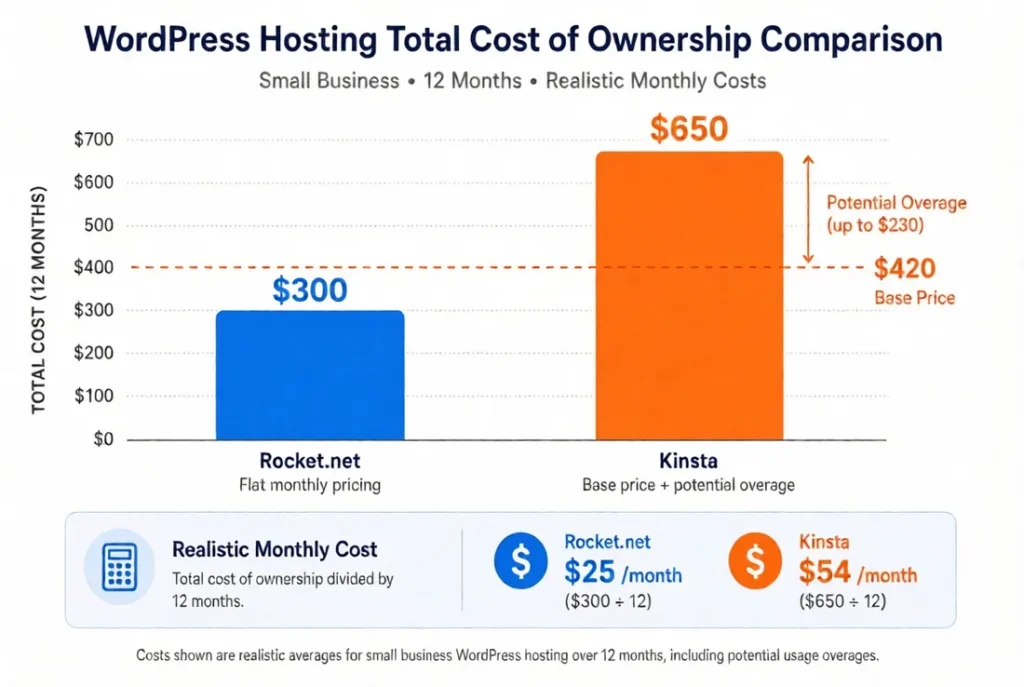
Rocket.net Starter stays flat at $25/mo ($300/year). Kinsta Single 35k starts at $30/mo ($360/year) but can rise if visits exceed the limit. The realistic chart above shows how a modest traffic increase can push Kinsta’s annual cost higher while Rocket.net stays unchanged.
2. Developer
Rocket.net Pro stays flat at roughly $50–$60/mo ($600–$720/year). You get unmetered visits, free Object Cache Pro, Redis, and WP Rocket.
Kinsta’s equivalent plan starts around $60/mo ($720/year). If traffic grows or you add Redis caching ($100/mo) or extra staging, the total can climb toward $950+.
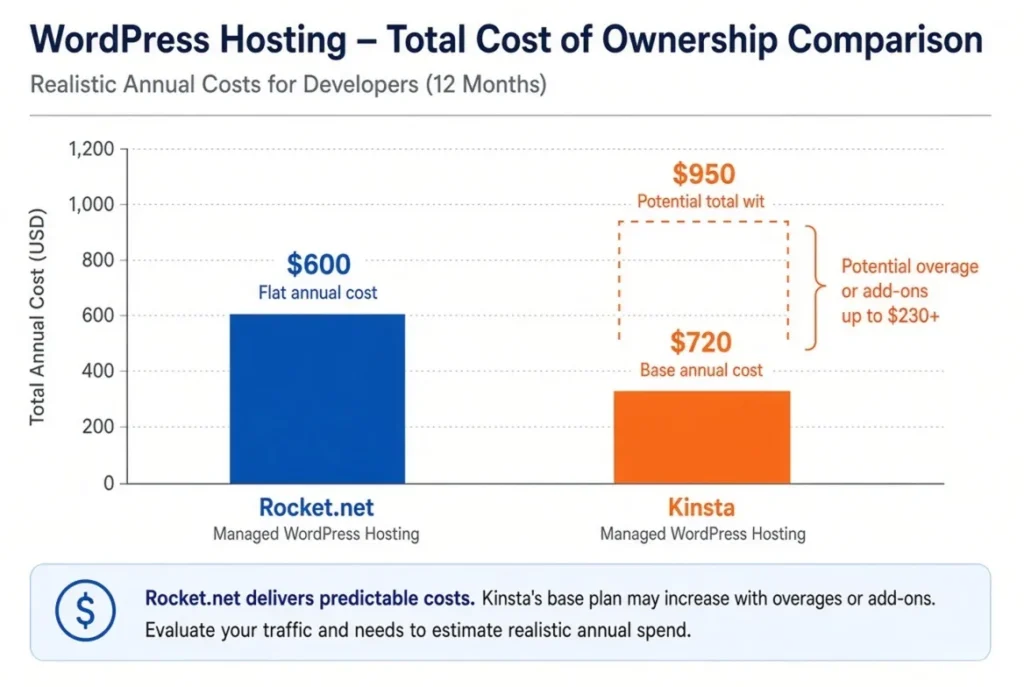
For developers who want predictable margins and AI/MCP workflows, Rocket.net keeps the bill simpler. Kinsta remains stronger if you specifically need the free APM tool and the deepest dashboard.
Rocket.net Pro keeps the bill predictable even with multiple sites and free advanced caching. Kinsta’s plan can increase with Redis add-ons or overages. Choose Rocket.net for margin stability and MCP; choose Kinsta if the APM tool and dashboard are essential.
3. Enterprise
Rocket.net Enterprise remains fixed. Kinsta’s higher tiers can still grow with traffic or add-ons. At this scale, many teams accept a higher or variable bill for Kinsta’s certifications and support volume. Others prefer Rocket.net’s flat cost and AI-native tools.
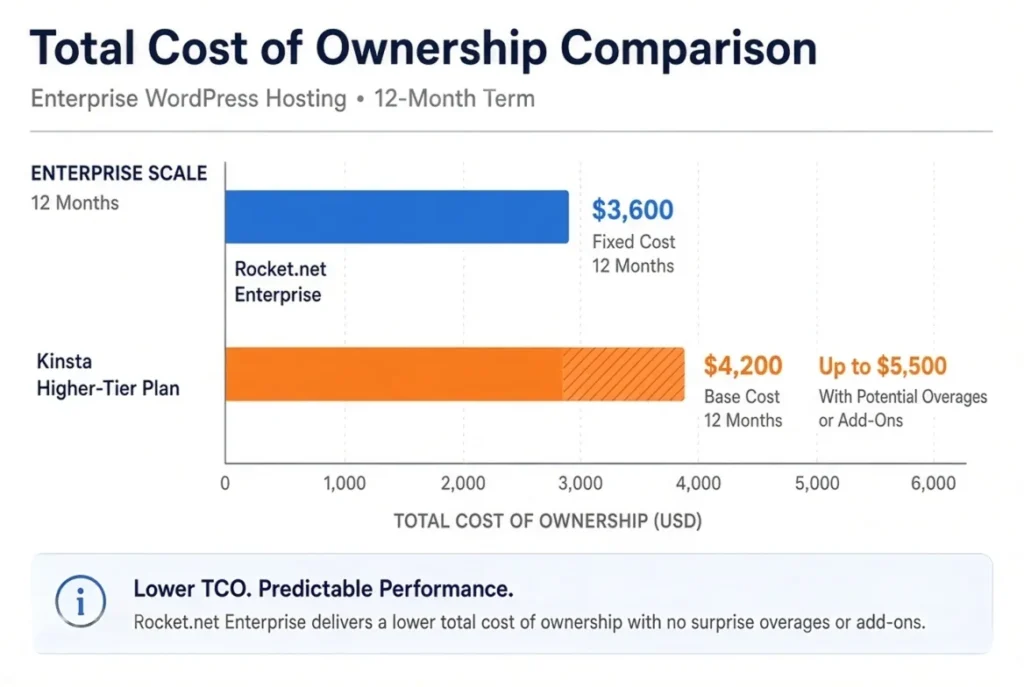
Rocket.net Enterprise plans keep a fixed monthly rate (example: ~$300/mo → $3,600/year). Visits stay unmetered and advanced caching tools are included.
Kinsta’s higher-tier plans start higher and can still add overage or add-on costs (example base ~$4,200/year, rising toward $5,500 with growth or extras).
At this level the decision usually shifts away from pure price. Kinsta’s public SOC 2 Type II and ISO certifications plus higher volume of engineer support often matter more for regulated or mission-critical sites. Rocket.net still wins if the priority is cost predictability and AI agent workflows.
In all three cases the pattern is the same: Rocket.net protects against surprise bills. Kinsta offers stronger tooling and compliance credentials at the risk of higher total cost if traffic or needs grow.
Performance and architecture
Both use Cloudflare Enterprise. Rocket.net leans harder into edge caching and unlimited PHP workers. Kinsta leans on premium Google Cloud machines and continuous database optimization. In practice both are fast. The difference most people feel is not raw TTFB on a cached page. It is how the site behaves under load and whether the bill changes.
Treat vendor TTFB claims carefully. Rocket.net publishes aggressive numbers; independent tests show both are strong. Cached pages on either host are very fast.
AI features comparison
Rocket.net has moved further into AI-native workflows. It offers native integrations for ChatGPT, Claude, and Gemini inside the dashboard, plus a full official MCP server so AI agents and IDEs can manage sites, run WP-CLI, and deploy without logging in. This is available to all customers at no extra cost.
Kinsta has published extensive content on AI crawlers, bot protection, and AI-assisted development, and it offers a free Bot Protection feature. It does not currently ship a native MCP server or first-class AI agent controls comparable to Rocket.net’s.
If you want AI agents to manage hosting directly, Rocket.net is ahead.
Support quality
Kinsta’s support is its clearest strength. Users on G2 regularly mention fast, expert responses (hundreds of mentions). Rocket.net support is solid and well-regarded on forums, but Kinsta has more public reviews and a stronger reputation for complex issues.
If the site makes money and you want the highest chance of speaking to an engineer quickly, Kinsta is the safer pick.
Ownership and certifications
- Rocket.net: Founded 2020 by Ben Gabler. Acquired in August 2025 by hosting.com / World Host Group (backed by Oakley Capital). Continues as its own brand.
- Kinsta: Independent company founded ~2013. Holds public SOC 2 Type II and ISO 27001, 27017, and 27018 certifications.
Kinsta has the stronger public compliance story for enterprise or regulated buyers.
Ratings & reviews
Kinsta has a much larger volume of public reviews and consistently high scores focused on support. Rocket.net scores well on Trustpilot but has far fewer reviews.
| Platform | Rocket.net | Kinsta |
|---|---|---|
| Trustpilot | 4.7/5 (~274 reviews) | 4.8/5 (~1,157 reviews) |
| G2 | Limited volume (strong support mentions) | 4.8/5 (1,400+ reviews) |
| Main praise | Speed, fast support response | Expert support, reliability, dashboard |
| Main complaint | Smaller review base, occasional edge cases | Pricing / visit limits |
Kinsta’s support reputation is the clearest advantage in public review data. Rocket.net’s support is well-regarded on forums and Trustpilot, but the volume is smaller.
Who should choose which
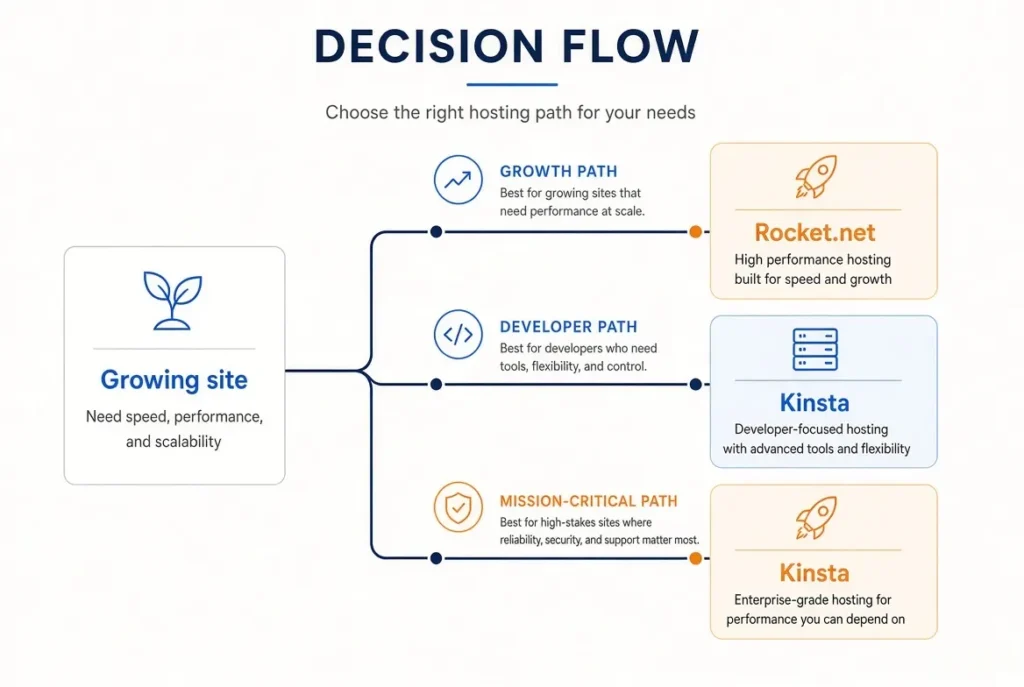
- 📝 Growing blog / content / variable traffic site → Rocket.net (unmetered , no overage risk + free WP Rocket + Object Cache Pro)
- 🛍️ WooCommerce with traffic spikes → Rocket.net (unlimited workers + free caching tools)
- 🏢 Agency / multi-site → Rocket.net (predictable margins + MCP)
- 🏢 Agency needing AI workflows → Rocket.net (MCP)
- ⚙️ Developer who wants APM and the best dashboard → Kinsta
- 🏛️ Mission-critical site that needs strongest support + compliance + heavy → Kinsta (SOC 2 + ISO + engineer support)
Which host fits which job
Pros and cons
Rocket.net
✓ Unmetered visits
✓ Unlimited PHP workers
✓ Object Cache Pro + Redis free
✓ Native MCP for AI agents
✓ Strong edge performance
✗ Fewer public reviews than Kinsta
✗ Fewer company-level public certifications
Kinsta
✓ Best-in-class support
✓ Excellent MyKinsta dashboard + free APM
✓ SOC 2 Type II + ISO 27001
✓ Strong long-term user satisfaction
✗ Visit limits + overage fees
✗ Redis caching is a $100/mo add-on
Bottom line
Rocket.net wins on cost predictability, included performance tools, and AI agent workflows. Kinsta wins on developer experience, support reputation, and public compliance certifications. Match the host to whether your traffic is stable and whether you value the dashboard more than visit headroom.
Both offer free migrations and a 30-day money-back guarantee. Start with the one that matches the job in front of you.
Ready to choose?
Match the host to the job in front of you
Both offer free migrations and a 30-day money-back guarantee. Confirm live prices at checkout.
Frequently asked questions
What happens when my plan renews?
Rocket.net Starter renews at its standard annual rate. Kinsta Single 35k renews at its standard rate. The bigger risk on Kinsta is overage fees if traffic grows past the visit limit. Rocket.net’s unmetered model keeps the bill flat.
Does Rocket.net really have unmetered visits?
Yes. Rocket.net does not charge based on visitor count. Your bill stays the same as long as you stay within bandwidth and storage limits.
Is Object Cache Pro free on Rocket.net?
Yes. Rocket.net includes Object Cache Pro on plans. Kinsta charges $100/month for equivalent Redis caching.
Which is better for AI workflows?
Rocket.net has native MCP support so AI agents can manage sites directly. Kinsta has strong bot protection and developer tools but no native MCP equivalent.
Do both offer free migrations and a money-back guarantee?
Yes. Both offer free expert migrations and a 30-day money-back guarantee.